

Trezor Safe 5 Review, Unboxing & Setup Guide
The Trezor Safe 5 is one of the Trezor’s newest top-tier hardware wallets, created to give users secure, self-custodial control over their crypto assets. It is available in most countries, including the UK, US, and EU.
This article reviews its availability, features, advantages and drawbacks, and compares the device with earlier Trezor models.

Image: Trezor Safe 5
Where to Buy the Trezor Safe 5
Before buying any hardware wallet, you should always purchase directly from the official manufacturer, not from an unofficial third party. This is extremely important for security reasons.
Trezor is part of SatoshiLabs in Prague.

Image: The Safe 5 offers enhanced features over the Trezor Model T; including a touchscreen, improved security, sleeker display and Gorilla Glass.
has also recently released the Trezor Safe 3, which is a more affordable model, but with slightly different features.

Image: Trezor Safe 3, a secure hardware wallet providing reliable cryptocurrency storage with user-friendly design and advanced protection features.
Trezor’s older models include:
Trezor Model One; released in 2014
Trezor Model T; released in 2018 (previous premium model)
It has been a long time since a new premium model was released, so the Safe 5 arrives at a good time.
Advantages of the Trezor Safe 5
Before discussing the Safe 5 specifically, one of the aims of crypto is the ability to be your own bank and have true sovereignty over your crypto assets.
A hardware wallet helps you do this.
If you store your assets in a hot wallet or on a centralised exchange (mobile or desktop), then in most cases, you do not truly hold your crypto — they do.
The Trezor Safe 5 supports thousands of cryptocurrencies, which you will see later in the setup section.

Figure: The Trezor Safe 5 supports thousands of cryptocurrencies, offering broad compatibility for diverse digital asset management.
Another significant advantage is:
Trezor devices are open source, unlike some other hardware wallets.
This allows the community to audit the code and removes concerns about hidden behaviour behind the scenes.

Figure: Open-source security: Trezor’s transparent design lets anyone audit the code for maximum trust.
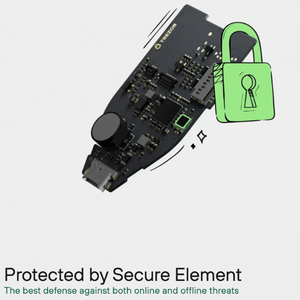
The Safe 5 also uses the NDA-free EAL 6+ Secure Element, which is a very high level of hardware security and an upgrade from previous models.
Other high-end wallets like the Ledger Stax use this secure element as well.

Figure: Trezor’s Secure Element protection: your strongest defence against online and offline threats.
The Safe 5 also includes a MicroSD slot on the side, which provides an extra layer of physical security. You can use a MicroSD card together with your PIN, adding extra protection against physical attacks.
You can enable or disable this feature in the device settings, or factory-reset the device and restore using your seed phrase.

Figure: MicroSD card PIN encryption binds your Trezor to a unique hardware secret, adding powerful protection against physical attacks.
You can also combine this with:
Trezor’s SLIP-39 Shamir backup system
Seed phrase shares kept in different physical locations
This reduces the chance of a single point of failure.

Figure: SLIP-39 standard for securely backing up cryptocurrency wallets using Shamir’s Secret Sharing for enhanced recovery and protection.
The Trezor Safe 5 also has an authentication feature every time you connect your Trezor to your computer, called bootloader verification, and this basically verifies that the firmware the Trezor is using is authentic and is the latest version, and it will let you know if it isn’t.

Figure: Bootloader verification ensures your Trezor only runs authentic, SatoshiLabs-signed firmware.
The Safe 5 has Gorilla Glass, which is durable, resilient, scratch-resistant, and roughly nine times stronger than standard glass; commonly used in modern smartphones.
.

Figure: The Safe 5 features Gorilla Glass coating, offering durable, scratch-resistant protection nearly nine times stronger than standard glass.
Since hardware wallets are cold storage and not used frequently, this durability is more than enough.
The Safe 5 includes a touchscreen that is responsive and a nice feature called haptic feedback, which basically means that when you confirm something on your Trezor Safe 5, it will give a little vibration.
Compared to the Trezor Model T, the Safe 5 is only about 20 Euros more expensive but offers:
A touchscreen
Improved security
A sleeker, more modern screen
Gorilla Glass instead of plastic framing


Figure: The Safe 5 offers enhanced features over the Trezor Model T; including a touchscreen, improved security, sleeker display, and Gorilla Glass
Disadvantages of the Trezor Safe 5
There are not many disadvantages, but a few points are worth mentioning.
- The Safe 5 looks like it has a larger screen compared to the Model T, but the screen is actually the same size. This may be disappointing for people with larger fingers.
- You can use a rubber-tip pointer if you struggle to use your fingers.
- The included USB-C cable is also quite short.
- If you use DeFi heavily, Trezor can sometimes be trickier to integrate with certain platforms, although workarounds usually exist.
- Phishing attacks targeting Trezor users have also occurred, so:
Never click unknown links
Always verify website URLs
Download only from Trezor’s official site

Figure: Trezor provides real-time security alerts to notify users of potential threats, ensuring safe and proactive cryptocurrency management.
When unboxing, check for:
Secure cellophane wrapping
Tear-away strip
A holographic sticker covering the USB-C port
If anything is missing, do not use it; contact Trezor immediately, as it may have been tampered with and your crypto could be at risk.
Removing the hologram leaves a “VOID” mark temporarily, which obviously shows you that your Trezor is void if you don’t have your sticker there when you buy it. But you can scrape it off and it does come off in time anyway, so isn’t a huge issue.
Inside the box:
USB-C to USB-C cable
Two blank seed phrase cards
The Trezor Safe 5 device
You can compare the Safe 5 to the Trezor Model T, they are similar in size, but the Safe 5 has a sleeker front and lacks the metallic backing.


Figure: Comparison of Trezor Model T and Trezor Safe 5
Comparing it to the Trezor Safe 3, which is a much smaller device that isn’t touchscreen and just has two buttons, the Safe 5 is much more modern.
Setup
If you’ve bought a Trezor Safe 5, directly from the remember, and have checked it hasn’t been tampered with, it is now time to set it up, if you look at the instructions, you’ll see that it tells you to firstly go to Trezor’s website, where you’ll need to download the Trezor software, which is how you can interact with your Trezor and crypto.

Figure: Trezor website page offering users to download Trezor Suite for secure cryptocurrency management.
Trezor website looks like the one shown in figure, and it is useful because if you click on Coins at the top, you’ll see which cryptocurrencies Trezor supports, either directly through the software that you need to download, which is called Trezor Suite, or indirectly through third party wallets. You can search by cryptocurrency given the large number that Trezor supports.
Once you’ve downloaded the Trezor Suite software and opens up, you’re ready to start setting up your Trezor.
If you do already have an older Trezor and have Trezor Suite installed on your computer, then you can just use this with the new Trezor Safe 5.
However, before doing this, please make sure you are always somewhere quiet where you can concentrate for a period of time, and definitely not in public as this must be private.
Once downloaded, open Trezor Suite and:
Click Set Up
Have a pen and paper ready to record the seed phrase words that you will be given
Install firmware onto the Trezor Safe 5, which ensures it has the latest version installed.
Complete the wallet backup
Write down the seed phrase accurately
Set a PIN
You must be accurate here and can’t make any mistakes. Just remember that the words you write down here are the key to accessing your crypto in future, so if you lose these or write them down incorrectly, you may not be able to recover your funds, which would obviously be a disaster.
After setup, you can:
Receive crypto
Send crypto
Explore additional security settings
Because should then secure their crypto backup properly using a leading crypto seed phrase storage solution like Cryptotag. is the leading and best-selling storage device for that.
Figure: Cryptotag, a company known for its premium titanium backup solutions for securely storing cryptocurrency recovery phrases. Source: Cryptotag.
James also offers 1:1 coaching to those who are genuinely looking to educate themselves in the crypto space.

Ready to Start Your Crypto Journey with Confidence?
Our upcoming Crypto Foundations course is designed to give you the essential skills to navigate the world of digital assets safely and effectively.
Don’t miss out!
Click Here to join the waitlist to get exclusive updates and be the first to know when we launch.